Generative and analytical artificial intelligence tools have significantly lowered the barrier to entry for independent filmmakers, podcasters, and digital media creators. Rather than replacing high-end human sound design, these tools optimize production workflows by automating routine audio cleanup, synthesizing placeholder effects, and generating non-linear background music under tight budgetary or time constraints.
I have discovered a few interesting Audio creating tools. At one point in my journey of creating content I stockpiled audio bits from cars and traffic. Now often I use firefly to create small noises, an example is using Adobe's Premiere's App and linking the audio together to create something new.
Core Audio AI Categories & Platforms
1. Synthesized Sound Effects (Foley)
Tool: ElevenLabs (Text-to-Sound) Check it Out Here
How it works: Instead of searching through pre-recorded sample libraries, you type in a plain-text description (like "heavy rain on a tin roof") and the platform generates a brand-new audio file from scratch.
Real-world results: It is incredibly accurate for environmental textures, background weather, and ambient room tones. While sharp, rhythmic sounds like footsteps can occasionally sound a bit synthetic or off-beat, it is an excellent, cost-free alternative to manual field recording or expensive commercial sound packs when you are on a budget.
Tool: Adobe Firefly (Audio & Sound Effects Suite) Check It Out Here
How it works: Integrated directly within Adobe's ecosystem (including the Firefly Video Editor and Premiere), this tool allows you to generate completely original, royalty-free background music and distinct ambient audio layers from text prompts.
It also includes an intuitive "Voice to Sound Effect" option where you can record yourself making a rough noise into a microphone to guide the timing, volume, and rhythm, which the AI then converts into a professional asset like a sliding metal spoon or a mechanical clink.
Real-world results: While standalone prompt generators are great for abstract ideas, Firefly stands out for absolute commercial safety. Because the model is trained entirely on licensed Adobe Stock and public domain assets, you do not have to worry about copyright strikes or shifting legal rules when publishing client work.
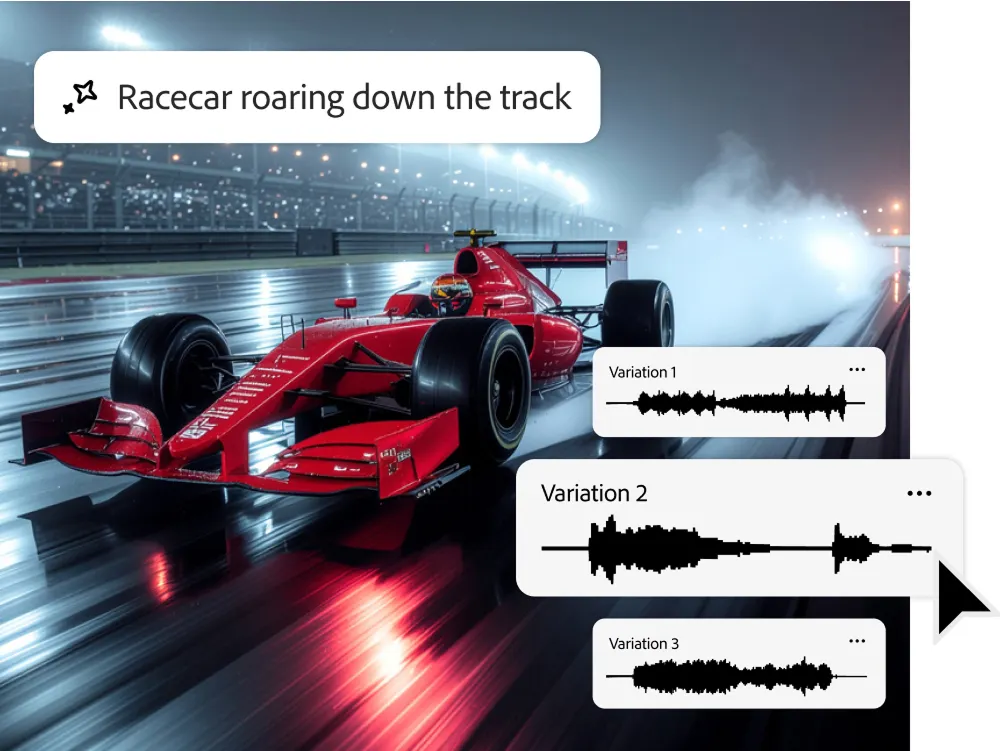
It serves as an incredibly useful "workflow assist" for putting together mood boards, layering clean atmospheric background textures, or extending small audio gaps right on your timeline without leaving your editing app.
2. Generative Music Platforms
| Platform | How It Works | What It Sounds Like | Best For |
|---|---|---|---|
| Boomy | Pure automation. Pick a genre and a mood, and it drops a track instantly. It even includes built-in pipelines to push your files directly to streaming platforms. | Simple, loop-based instrumental background tracks. | Quick, low-stakes background music for casual streams, vlogs, or social content. |
| Mubert | Generates tracks in real time, leaning heavily into modern electronic beats, textures, and synth arrangements. | Clean, high-quality, continuous electronic audio. | Tech tutorials, workout videos, and seamless ambient loops. |
| Soundraw | Gives you hands-on control over the arrangement. You can easily adjust the tempo, swap out specific instruments, and dial the energy up or down for different sections. | Customizable, flexible musical tracks that map perfectly to your video's pacing. | Creators who want precise control over where a song swells or drops without needing a background in music theory. |
3. AI-Assisted Audio Restoration & Clean-Up
Adobe Podcast (Beta Enhanced Speech)
Best for: Fixing vocal tracks recorded on cheap microphones or in noisy, untreated spaces (like a bedroom with heavy traffic hum or bad room echo).
The results: It strips away the ambient noise and reshapes speech frequencies, instantly making a rough recording sound like it was captured in an acoustically treated studio.
Acon Digital (Restoration Suite)
Best for: Audio forensics, removing target noise, and repairing damaged legacy media like old tape transfers.
The results: It isolates and cleans up complex tape hiss, old machine hums, and audio dropouts from degraded files without making the remaining voices sound muffled or artificial.
Technical Integration in Digital Workflows
In a fast-paced production pipeline, AI audio tools generally pull weight in two distinct phases:
4. AI-Assisted Captions
You see captions all the time on TikTok, YouTube and Instagram... how do they do it? Most are done in app but they can also be done through professional features
Adobe Premiere Pro
Allows for captions, exporting and downloading as well as custom editing the text that is generated.
Speechify (AI Voiceover & Dubbing)
Best for: Converting scripts into incredibly natural-sounding voiceovers, creating realistic temporary narrations, or expanding content reach with instant multi-language dubbing.
The results: It completely skips the robotic monotone of traditional text-to-speech, delivering voice tracks with realistic human inflection, rhythm, and emotion. It is a massive time-saver for solo creators who need clean narration quickly, or editors wanting to test voice timing before booking professional voice talent.
Phase 1: Pre-Production & Prototyping
- Instant Foley: Whipping up quick placeholder sound effects to drop into rough cuts.
- Scratch Tracks: Generating fast voice or ambient beds to lock down pacing and video timing early.
- Proof of Concept: Building low cost layout tracks to get client buy in on the overall vibe before spending real budget.
Phase 2: Post-Production & Restoration
- Dialogue Cleanup: Stripping out ambient room tone and environmental noise from raw voice tracks.
- Artifact Removal: Salvaging corrupted source files by killing digital clicks, hiss, and hum.
- Balance & Leveling: Smoothing out erratic background audio to keep the spotlight on the main mix.
Industry Constraints and Risk Assessment
1. The Quality and Narrative Gap
AI handles isolated sound prompts incredibly well, but it flies completely blind when it comes to pacing, narrative tension, and emotional weight. A professional sound designer uses deliberate choices—like strategic silence or psychoacoustic mixing—to build suspense and hint at subtext. AI doesn't understand drama; it can't read between the lines or make intentional, big-picture storytelling adjustments.
2. Legal and Commercial Compliance Risks
The legal landscape around generative AI audio is changing by the week. If you’re delivering commercial work, you have to audit the EULAs constantly:
- Streaming & Licensing Rights: Platforms frequently rewrite the rules on who owns the intellectual property, how content can be monetized, and where it can be distributed.
- The Free-Tier Trap: Commercial rights are almost always locked behind premium subscriptions. Using free-tier generations on a client project is a fast track to copyright strikes, platform bans, or legal headaches down the road.
The Bottom Line
At the end of the day, AI audio utilities are not a magic wand that replaces a seasoned engineer, but they are a massive superpower for modern creators. Whether you are using ElevenLabs or Firefly to scratch together quick, temporary assets, leveraging tools like Boomy and Soundraw to pin down a musical vibe, or leaning on Adobe and Acon to salvage poorly recorded vocals, these tools save you serious time and budget. The key is knowing their limits.
Treat AI as your ultimate assistant to handle the tedious heavy lifting, the prototyping, and the technical cleanupbut keep your hands on the steering wheel when it comes to the legal nuances, the commercial licenses, and the true emotional storytelling that only a human creator can pull off.